 Skip to content


Every CXM vendor will tell you they cover all your channels, have AI built in, and integrate with everything.
The demo is always polished. The platform looks clean. The sales team knows exactly which slides to skip past. The question isn’t whether the demo works – it’s what happens on day 60, when your team is dealing with a real complaint spike at 2pm on a Friday and the platform needs to actually perform.
Most CXM buying decisions get made on feature checklists. A platform “does social listening” and that box gets ticked. But a platform that pulls 20+ channels into a single timeline with real-time multilingual sentiment scoring is not the same product as one that monitors Twitter and sends a daily email digest. Both answer “yes” on the checklist.
This guide covers what each feature should actually deliver – operationally, under real volume – and what weak implementations look like versus strong ones. Bring these criteria to your next demo. The answers will tell you more than the slides ever will.
TL;DR:
- Feature depth matters more than feature count. “Social listening” and “AI” cover everything from keyword alerts to enterprise-grade sentiment intelligence – the checkbox doesn’t tell you which.
- Evaluate every feature by what it does under real load, not what it claims on a features page. The ten features below are non-negotiable for enterprise CXM.
- For each one, the weak implementation is a common trap. Know how to tell the difference before you sign.
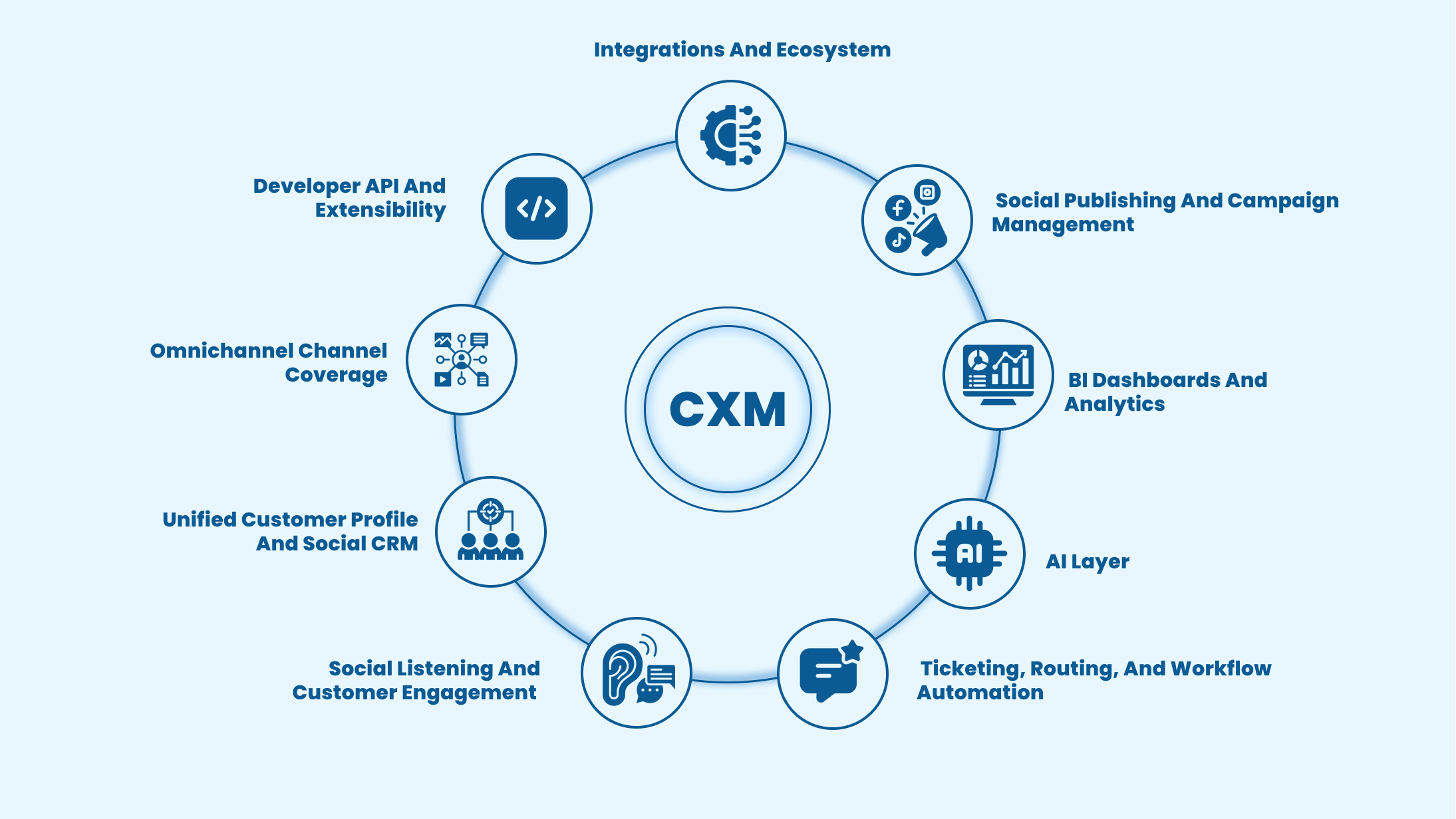
Must-have CXM platform features – and how to evaluate each one
A breakdown of must-have CXM features and practical ways to evaluate their effectiveness before making a decision.
1. Omnichannel channel coverage
What it delivers: every customer signal, regardless of origin, flowing into one unified system. Not “we support multiple channels” – one timeline per customer across every channel they’ve used.
True omnichannel coverage means social platforms, review sites, web sources including forums and news, messaging apps, email, and voice all feeding into a single customer record. The customer who tweets Monday, emails Tuesday, and calls Wednesday should have one profile with all three interactions in chronological order.
Weak implementation:
Five channels covered, each in a separate tab, no shared customer identity linking them.
Strong implementation:
20+ channel ingestion, unified customer timeline, real-time updates across all sources.
Question to ask in the demo:
Show me a single customer record with history from at least three different channels. How was that data linked – was it automatic or did someone configure it manually?
2. Unified customer profile and Social CRM
What it delivers: persistent, enriched customer records that every team – support, marketing, sales – reads from and writes to in real time.
Identity resolution is the hard part. A customer using different email addresses on different channels, or a different username on Twitter than their support account, should still resolve to one record. Weak platforms create duplicate profiles. Strong ones reconcile across identifiers automatically.
What the profile should contain: full interaction history across channels, sentiment trend over time, customer tier or value segment, open tickets, past resolutions, and behavioural signals like escalation patterns. When an agent opens a ticket, all of this should be visible before they type a single word.
Weak implementation:
Separate ticket histories per channel, no cross-channel identity resolution, agents ask customers to repeat themselves.
Strong implementation:
Persistent enriched profile, automatic identity linking, agents start every interaction with full context.
Why it matters operationally:
Agents who have context resolve issues faster and escalate less. First contact resolution rates improve directly when the profile is comprehensive. This feature alone has more impact on handle time and repeat contact rate than almost anything else in the stack.
3. Social listening and Customer Engagement
What it delivers: signals from everywhere your customers talk – including the channels you didn’t open and the conversations you weren’t tagged in.
Basic monitoring means keyword alerts when someone mentions your brand handle. Real social listening means tracking brand mentions, product-level conversations, competitor activity, and sentiment trends across social, forums, news, blogs, and review platforms – with multilingual sentiment scoring running across all of it in real time.
Managing, responding to, and reporting on reviews across Google Business, Healthgrades, Trustpilot, app stores, and marketplace pages – across multiple locations if relevant – is a distinct workflow from social monitoring. Many platforms claim both and deliver one.
Weak implementation:
Twitter and Facebook only, English-language sentiment, manual review export.
Strong implementation:
20+ source monitoring, multilingual sentiment, competitive benchmarking, integrated workflows for review site management.
Question to ask in the demo:
Pull a cross-source report showing sentiment trends across social and review platforms simultaneously, filtered by a specific product or location. If this requires an export to another tool, that’s your answer.
4. Ticketing, routing, and workflow automation
What it delivers: every complaint, regardless of channel, converted to a tracked ticket – routed to the right team, with SLA running, before any human has to manually sort it.
This is the execution layer of CXM. Listening without action is a reporting function. The ticketing system is where signals become accountable workflows.
Auto-ticket creation should fire from social mentions, review posts, email, chat, and call transcripts without manual intervention. Routing logic should assign based on sentiment score, complaint category, customer tier, channel, and product line – not a single catch-all queue. Escalation rules should fire before SLA breaches happen, not after.
Weak implementation:
Manual ticket creation for social complaints, basic priority tiers, SLA tracking that alerts after breach.
Strong implementation:
Auto-ticket from all channels, intelligent routing by multiple variables simultaneously, proactive SLA alerts, no-code automation that non-developers can configure.
What to probe:
Ask the vendor to demonstrate creating a ticket from a social post live in the demo, then show how routing logic assigns it. Watch for how many clicks are required and whether a human decision is needed anywhere in that flow.
5. AI layer – sentiment, summarisation, and quality scoring
What it delivers: operational efficiency embedded throughout the workflow – not a standalone feature, but AI running at every stage from signal capture to resolution.
The honest frame here: “AI-powered” appears on almost every CXM vendor’s website. What varies enormously is what the AI actually does and where it runs.
At minimum, a credible AI layer should cover: sentiment and emotion detection at ticket creation, conversation summarisation so agents don’t read twelve-message threads before responding, response suggestions calibrated to complaint category and tone, agent quality scoring to identify coaching opportunities, and predictive alerts that fire when sentiment spikes before complaint volume reaches crisis level.
Weak implementation:
Basic positive/negative/neutral sentiment tagging, no workflow integration.
Strong implementation:
Emotion-level detection, multi-language capability, summarisation and response assist in the agent workspace, quality scoring that learns over time.
Critical governance question:
Is the AI running on the vendor’s own infrastructure or calling a third-party API? If customer data is leaving the platform to process through an external AI provider, that matters for data governance – especially in financial services, healthcare, and any regulated environment.
6. BI dashboards and analytics
What it delivers: self-serve reporting that serves every stakeholder – CX ops, marketing, and leadership – from the same data layer, without exports.
Different functions need different cuts of the same data. CX ops needs ticket volume, SLA adherence, and first contact resolution. Marketing needs sentiment by campaign and share-of-voice by category. Leadership needs retention trends, complaint volume by product line, and sentiment tracked against business outcomes.
Weak implementation:
Fixed dashboards, data export required for custom analysis, separate tools needed for different stakeholders.
Strong implementation:
Pre-built dashboards by function, fully custom drag-and-drop dashboards, drill-down from aggregate trend to individual ticket, category-level analysis by product or region.
What distinguishes strong from weak here:
Can a non-technical CX manager build a new dashboard view without developer support? If the answer requires a support ticket to the vendor’s implementation team, the analytics aren’t genuinely self-serve.
7. Social publishing and campaign management
What it delivers: the ability to publish brand content and monitor its reception in the same system – connecting what you put out with how customers respond.
This is a feature that most brands treat as a standalone scheduling tool and most CXM platforms treat as an afterthought. The real value is the connection. When a campaign goes live and complaint volume spikes around a specific product mentioned in it, both signals should be visible in the same platform without switching tools.
A publishing capability worth having covers: multi-channel scheduling with approval workflows, content calendar management, post-level performance tracking, and the ability to correlate campaign activity with sentiment and ticket volume in the same analytics layer.
Weak implementation:
Basic scheduling in a separate module with no connection to listening data.
Strong implementation:
Publishing and listening data visible in the same dashboard, campaign sentiment correlation, approval workflows for brand governance.
8. Surveys and feedback capture
What it delivers: structured customer feedback that sits alongside organic signals in the same dataset – so you have both prompted and unprompted sentiment in one view.
Surveys capture what customers say when asked. Social listening captures what they say when they’re not. Both are incomplete without the other. A CXM platform that only does one forces you to reconcile two different data streams manually.
CSAT, NPS, and custom survey types should be distributable across channels – post-interaction email, in-app prompt, post-call SMS – and the responses should flow into the same analytics layer as social and review data. Not a separate survey dashboard. The same one.
Weak implementation:
Survey tool disconnected from core CX data, manual export required to analyse alongside tickets and sentiment.
Strong implementation:
Survey responses and organic feedback unified in one analytics layer, sentiment trending across both data types.
9. Integrations and ecosystem
What it delivers: customer context flowing into and out of the CXM platform automatically – so agents have the data they need without switching systems.
No CXM platform exists in isolation. The value of the platform scales directly with how well it connects to the rest of your stack. Critical integrations: CRM (Salesforce, MS Dynamics, HubSpot), contact centre and CTI, chatbot platforms, order management systems, and loyalty platforms.
The quality test is bidirectional sync. A CXM platform that receives data from your CRM but doesn’t write resolved cases back creates a divergence problem. Agents in CRM see incomplete history. Agents in CXM see incomplete order context. Neither has the full picture.
Weak implementation:
One-way data sync, pre-built connectors that break on platform updates, integrations that require developer involvement to maintain.
Strong implementation:
Bidirectional sync, pre-built no-code connectors for common platforms, API access for custom integrations, integration health monitoring.
Use case to probe:
Ask the vendor to show how a customer’s open support ticket in the CXM platform appears in your CRM, and vice versa. If that view doesn’t exist or requires manual synchronisation, the integration isn’t genuine.
10. Developer API and extensibility
What it delivers: the ability to build custom workflows, embed CXM data into other systems, and adapt the platform to enterprise requirements that no out-of-box feature set fully anticipates.
Enterprise CX environments are complex. At some point, every large brand needs to extract data, build a custom reporting view, automate a workflow the platform doesn’t natively support, or connect to a system without a pre-built connector. Without API access, the platform becomes a silo.
A credible API layer covers: full CRUD operations on core data objects, webhooks for event-based triggers, well-documented endpoints with versioning, and sandbox environments for testing integrations before production deployment.
Weak implementation:
Read-only API, no webhook support, documentation that’s a year out of date.
Strong implementation:
Full bidirectional API, webhook event library, version control, active developer documentation, and a support pathway for integration builds.
How to evaluate these features in a demo
Five questions. Bring them to every vendor meeting. The answers reveal depth – or the absence of it.
1. Show me a real customer record with history from at least three different channels. How was that data linked?
This tests identity resolution and channel unification simultaneously. If the demo shows three separate profiles or requires manual configuration to link them, the unified customer profile feature is surface-level.
2. Create a live ticket from a social post and show me how it gets routed based on sentiment and customer tier.
This tests whether ticketing and routing are genuinely automated or whether a human decision is required somewhere in the chain. Watch how many clicks it takes and whether the demo switches to a different screen mid-flow.
3. Show me your sentiment analysis working on a non-English conversation – in a language relevant to our market.
Multilingual sentiment is a hard capability. If the vendor asks which language in advance or the demo conveniently uses only English, that’s the answer.
4. Walk me through what happens when an SLA is about to breach. What does the alert look like and who sees it?
This distinguishes proactive SLA management from post-breach notifications. The alert should fire before the breach, route to a named person, and include the ticket context without requiring a separate login.
5. Is your AI running on your own infrastructure or a third-party API? How does that affect where our customer data is processed?
For any regulated industry or enterprise with data governance requirements, this question is non-negotiable. Vague answers about “cloud infrastructure” are not sufficient.
Conclusion
The best CXM platform isn’t the one with the longest feature list.
It’s the one where each feature works at the depth your operations actually require – under real volume, with real data, across the channels your customers use on their worst day with your brand. The checklist gets you to a shortlist. These questions get you to the right answer.
Frequently Asked Questions
Author


