At Konnect Insights, we’re continuously working to make your experience smarter, more intuitive, and more powerful. In this month’s release, we’ve focused on delivering features that empower teams with AI-driven tools, enhance publishing workflows and strengthen security. All designed to help you connect with your audience more effectively than ever before.
This update brings a host of exciting enhancements across the Publish module, including mandatory multi-approver workflows, LinkedIn Event Posts, Facebook Reel collaboration, and prompt-based content generation using Konnect AI+ . Whether you’re creating engaging social posts or managing complex approval processes, these new capabilities streamline your workflow and elevate your creative potential.
We’ve also introduced real-time translation support, Twitter DM replies, and image tagging on X (Twitter), enabling richer customer interactions and smoother team collaboration. Plus, with the addition of Pinterest and TikTok integrations, your brand can now reach audiences across even more platforms, all from within a single interface.
Behind the scenes, we’ve made key improvements to TAT settings and security features, including encryption for sensitive data fields and SMS-based two-factor authentication, ensuring your data and accounts remain safe while giving you greater control over your workflows.
Dive into the full list of updates below and discover how the June 2025 release helps you unlock new possibilities in customer engagement, content creation, and digital strategy.
1. Parent-Child Ticketing
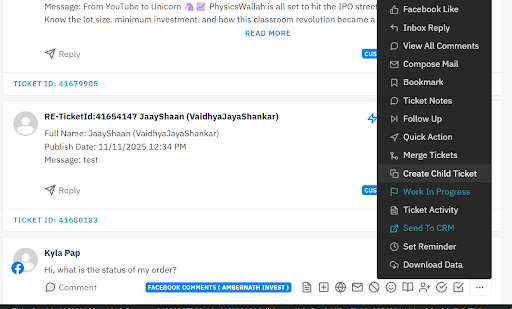
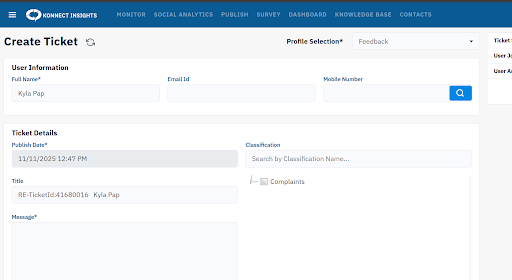
The Parent-Child Ticket feature has been introduced to enhance internal coordination when multiple teams or agents are involved in resolving the same issue. This functionality allows users to create a child ticket under a parent ticket, enabling different agents or departments to work on their respective tasks simultaneously while maintaining a clear link between related activities.
The parent ticket remains open until all associated child tickets are completed, ensuring that no task is closed prematurely and that every aspect of the issue is properly addressed. This structured approach improves collaboration, accountability, and workflow efficiency across teams handling interconnected support tasks.
Navigation: Go to tickets > Click on the three dots > Click on create child ticket > Then create a ticket just like we create a manual ticket and keep the status of the ticket as needed
2. Merging Two tickets made possible
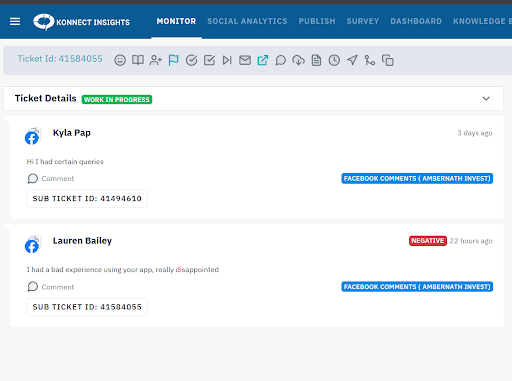
The Merge Tickets feature has been enhanced to provide greater flexibility and accuracy when managing conversations from the same platform. With this update, users can now merge tickets that originate from the same social channel, even if they include different media types such as mention, dm, comment, etc
This improvement ensures that all related interactions from the same platform are consolidated into one unified thread, helping teams maintain complete context, avoid duplicate handling, and streamline response management for a more efficient workflow.
Navigation: Go to tickets > Click on three dots of a particular ticket > Select the merge tickets option> Enter the Ticket ID and press enter > The ticket will appear below > Select the ticket and press submit
3. Knowledge Base
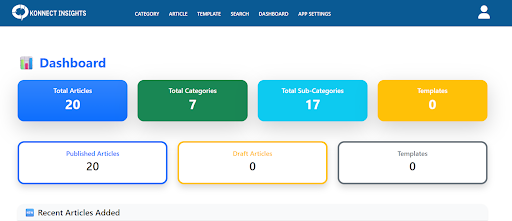
The Knowledge Base feature empowers brands to create their own internal guidebook for agents, serving as a centralized hub for information and best practices. With this enhancement, teams can build and organize multiple articles, categories, and subcategories to cover various topics, workflows, or FAQs.
This structured setup helps agents quickly find accurate information, reduces dependency on supervisors, and ensures consistent, informed responses to customer queries. By maintaining an up-to-date knowledge repository, brands can enhance training, improve efficiency, and promote self-sufficiency across their support teams.
4. Block User : For Facebook Dm & Comments
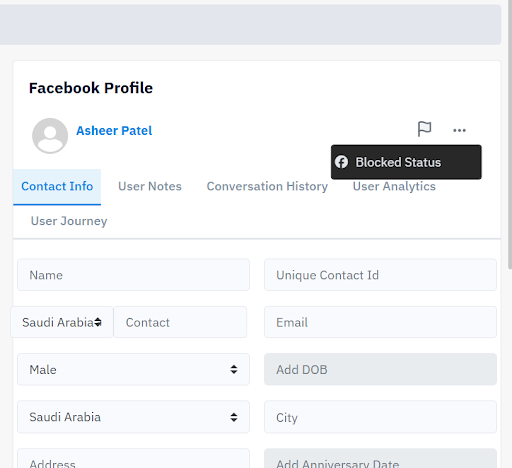
The DM Block User feature is now extended to Facebook DMs and Comments, allowing users to block individuals directly from within the Konnect Insights interface. This enhancement gives teams greater control over managing negative or spam interactions across Facebook, ensuring safer and more professional community engagement.
By enabling quick blocking without switching platforms, it streamlines moderation and helps maintain a positive brand environment.
Navigation: Go to tickets > Open one ticket view of a particular ticket > On the right side we can see the Facebook user profile > Click on three dots > From there block the user
5. Dynamic Placeholder available in DM
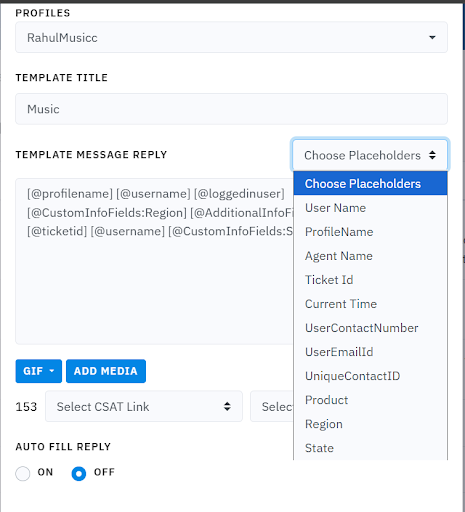
The Dynamic Placeholders feature has been introduced to make replies more personalized and informative when responding to tickets. This functionality can be used while replying to Direct Messages (DMs) and allows users to include additional fields such as Additional Info and Custom Info within their responses.
By automatically pulling relevant customer details into replies, Dynamic Placeholders help agents save time, reduce manual entry, and ensure that every message is contextually accurate and tailored to the recipient.
Navigation: Click on setting and Admin > Navigate to Draft Message Templates > Make a draft and add the Dynamic Placeholder as per needed > The details of the same will be fetched from the ticket
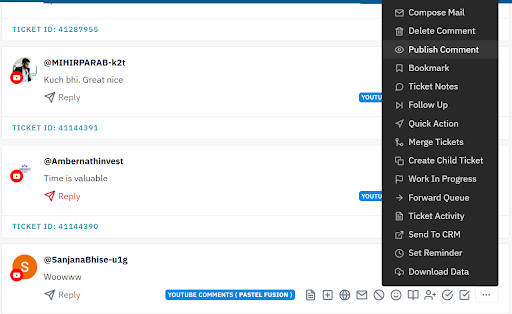
6. Youtube Comments can be kept on held until reviewed
The YouTube Comments Publish feature gives users more control over managing audience interactions. With this update, we fetch comments which are kept in a private “held” state, allowing teams to review them before deciding whether to make them public. If needed, the “held” status can be removed, after which the comment will appear on the native YouTube platform.
This feature helps maintain the quality and appropriateness of public discussions while ensuring brand safety. Note that replies cannot be made to comments that are in the held state, preserving moderation control until the comment is approved.
Navigation: Click on the Three dots of a Held ticket of Youtube Comments > Click on Publish Comment and Publish Comment to public
7. Compose Mail for Social Button
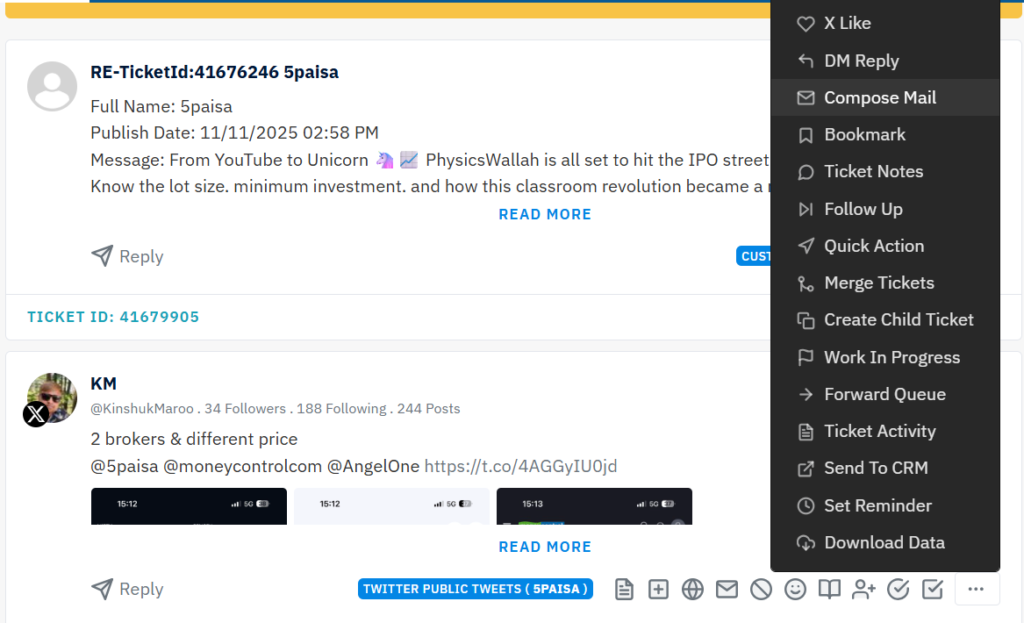
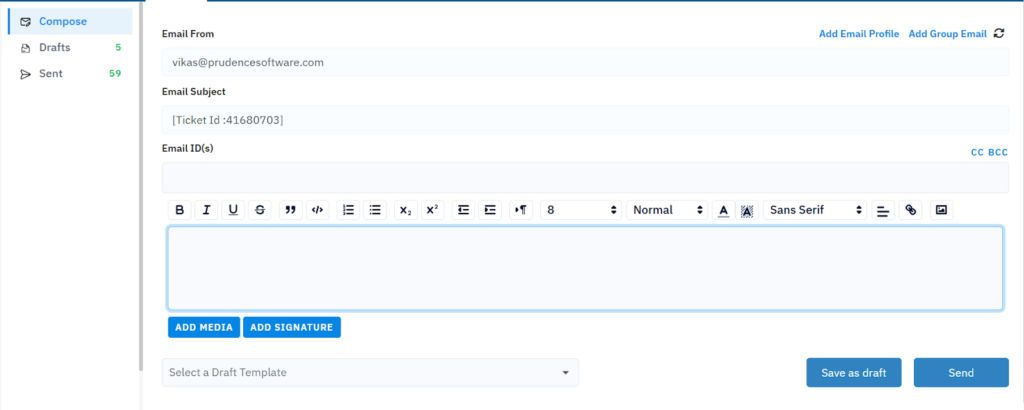
The Compose Mail feature allows users to seamlessly communicate with their internal teams directly from within a ticket. With this enhancement, you can send an email related to a specific ticket, where the ticket ID is automatically set as the subject line, ensuring clear tracking and reference.
The compose window provides a dedicated space to write and share important details or context with your team, streamlining collaboration and reducing the need to switch between platforms. This feature enhances internal communication, keeps discussions organized, and ensures all correspondence remains linked to the relevant ticket for easy follow-up.
Navigation: Go to a particular ticket > Click on three dots > Click on Compose mail > The ticket id is in the subject and you have a dedicated space for composing the draft
8. Sound notification for new message in Conversation view
A new sound notification feature has been added to the Conversation View to alert users when a new message arrives. This enhancement ensures that agents never miss an incoming response or update, even while multitasking within the platform.
It helps improve responsiveness, keeps communication timely, and enhances overall efficiency in managing customer conversations.
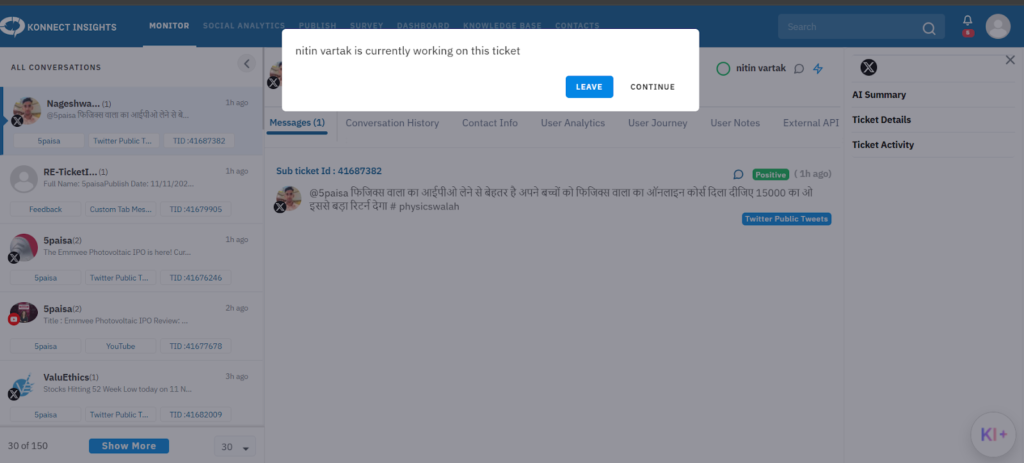
9. Multiple agents cannot work on same ticket: Now available in Conversation View
In the Conversation View, a new control has been introduced to prevent multiple agents from working on the same ticket simultaneously. If an agent is already active on a ticket, other users attempting to access it will now receive a message indicating that the ticket is currently being handled.
This enhancement helps avoid duplicate responses, ensures smoother coordination among team members, and maintains clarity and consistency in customer communication.
10. Automation activation: Now available on front end
The Automation Activation feature is now available directly on the front end, empowering clients to enable or manage automations on their own without backend assistance.
This update gives users greater autonomy and flexibility to configure workflows as needed, ensuring faster setup, quicker implementation of automation rules, and reduced dependency on support teams for routine activation tasks.
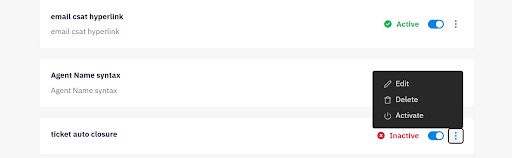
Navigation: Click on settings > Go to Admin > Navigate Automation > Create an automation and finish it > Activate the automation by clicking on the three dots and selecting active
11. Smart Suggestions now available for Threads
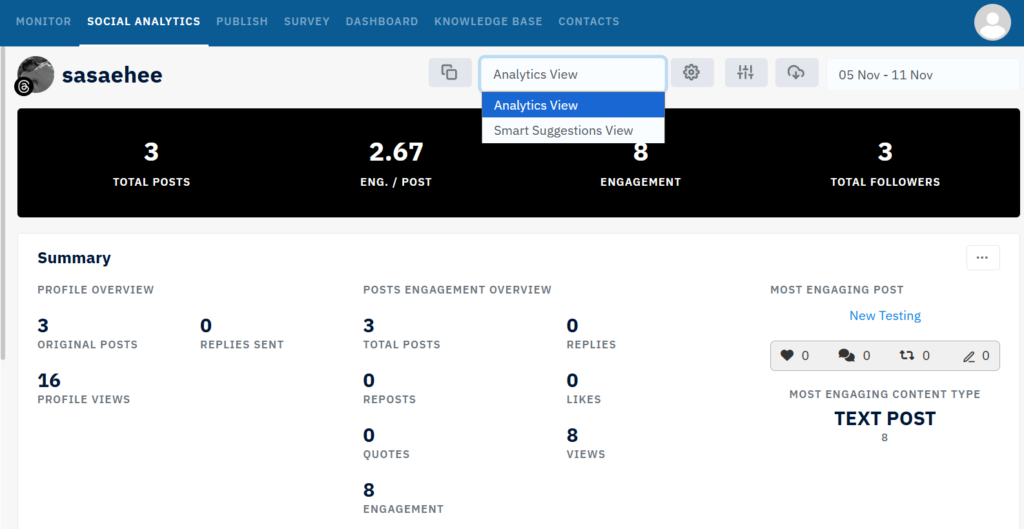
The Smart Suggestions for Threads Platform feature has been introduced under Social Analytics to help brands make data-backed decisions for improved engagement and visibility. This intelligent tool analyzes performance trends on the Threads platform and provides actionable insights tailored to your brand’s activity and audience behavior.
Through the Smart Suggestions view, users can discover key insights such as the best time to post, days with highest and lowest engagement, and detailed fan interaction summaries. By leveraging these insights, brands can refine their content strategy, post at optimal times, and enhance overall performance on Threads, ensuring every post reaches its maximum engagement potential.
Navigation:Click on Social Analytics > Select Threads profile > On top besides date filter, click on Analytics View > You will have an option of selecting the Smart Suggestion View
12. Google Analytics : Active Users by Country
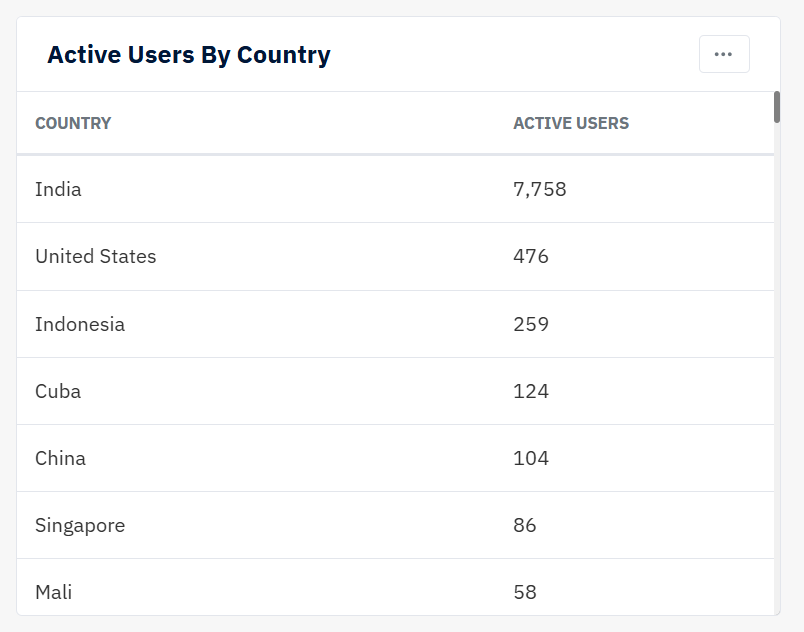
The Active Users by Country chart has been added to Google Analytics under the Social Analytics module, providing deeper insights into your audience demographics and engagement distribution. This chart visually represents the number of active users across different countries, helping brands understand where their audience is most active and how engagement varies geographically.
By analyzing this data, teams can identify top-performing regions, tailor content strategies for specific markets, and make more informed decisions on targeting and campaign planning. This enhancement strengthens the analytics experience by combining audience geography with activity insights for a clearer picture of global performance.
Navigation:Click on Social Analytics > Select Google Analytics profile > Scroll down to Active Users by Country Chart
13. Google Analytics : Active Users by City
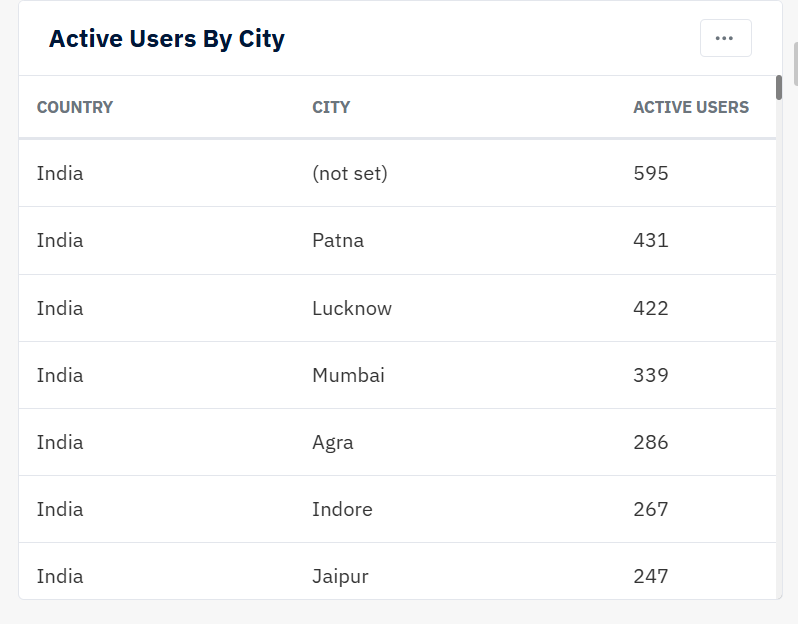
The Active Users by City chart has been introduced in Google Analytics under the Social Analytics module to provide more granular insights into audience engagement. This chart displays the number of active users segmented by city, allowing brands to pinpoint where their audience is most active at a local level.
With this detailed view, teams can identify high-performing cities, compare regional engagement patterns, and adapt their content and campaign strategies accordingly. This enhancement enables more targeted decision-making and helps brands better understand their audience distribution beyond just country-level insights.
Navigation: Click on Social Analytics > Select Google Analytics profile > Scroll down to Active Users by City Chart
14. Google Analytics : Active Users by Language
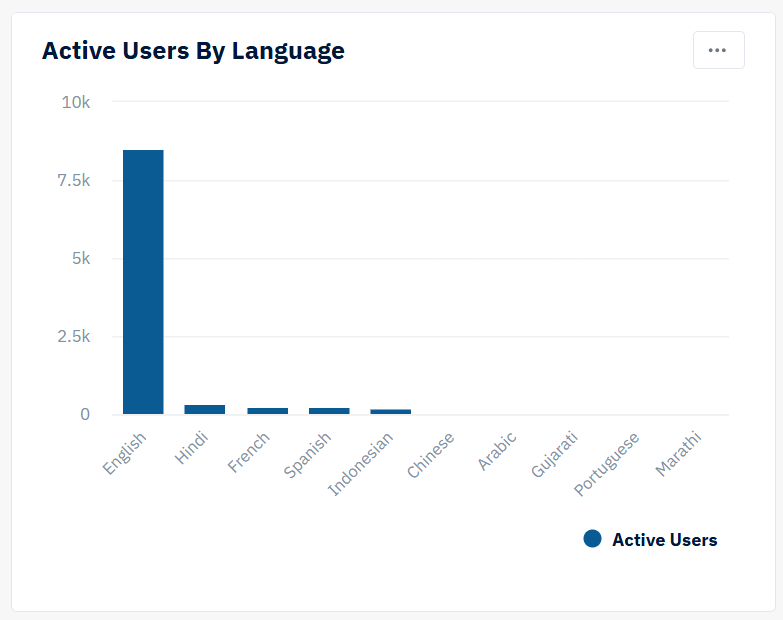
The Active Users by Language chart has been introduced in Google Analytics under the Social Analytics module, providing valuable insights into the preferred languages of your active users. This chart helps brands understand the linguistic distribution of their audience, revealing which languages are most commonly used when engaging with your content.
By analyzing this data, teams can tailor communication strategies, create multilingual content, and deliver more personalized experiences for different audience groups. This enhancement strengthens audience understanding and supports more inclusive, globally resonant content planning.
Navigation: Click on Social Analytics > Select Google Analytics profile > Scroll down to Active Users by Language Chart
15. Google Analytics : Active Users by Minute
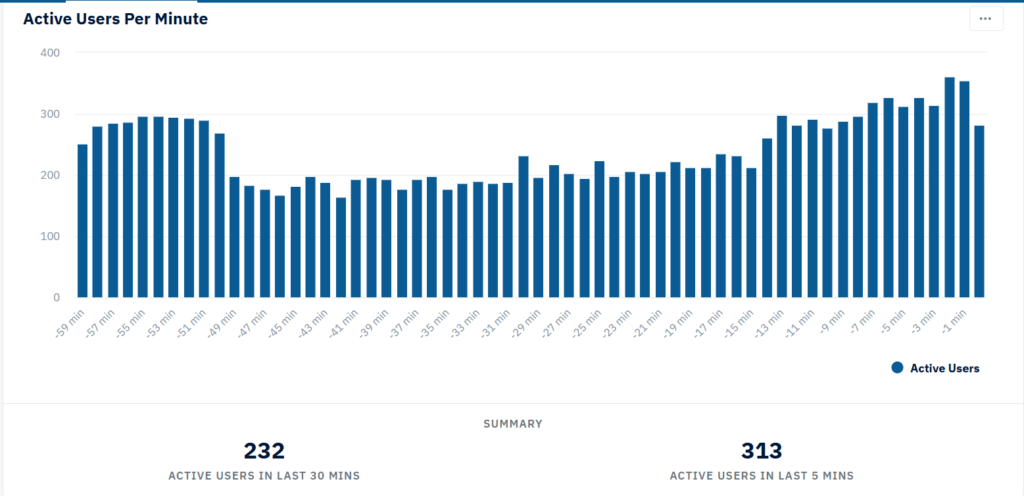
The Active Users by Minute chart has been added to Google Analytics under the Social Analytics module, allowing real-time tracking of user activity at a granular level. This chart displays how many users are active on your platform each minute, giving teams an instant view of audience engagement trends as they happen.
With this level of precision, brands can monitor live traffic spikes, measure the immediate impact of content or campaigns, and make timely adjustments to maximize engagement. This enhancement provides a dynamic, real-time perspective of audience behavior, helping teams stay agile and responsive to activity patterns.
Navigation: Click on Social Analytics > Select Google Analytics profile > Scroll down to Active Users by Minute Chart
16. Google Analytics : Active Users by Device Category
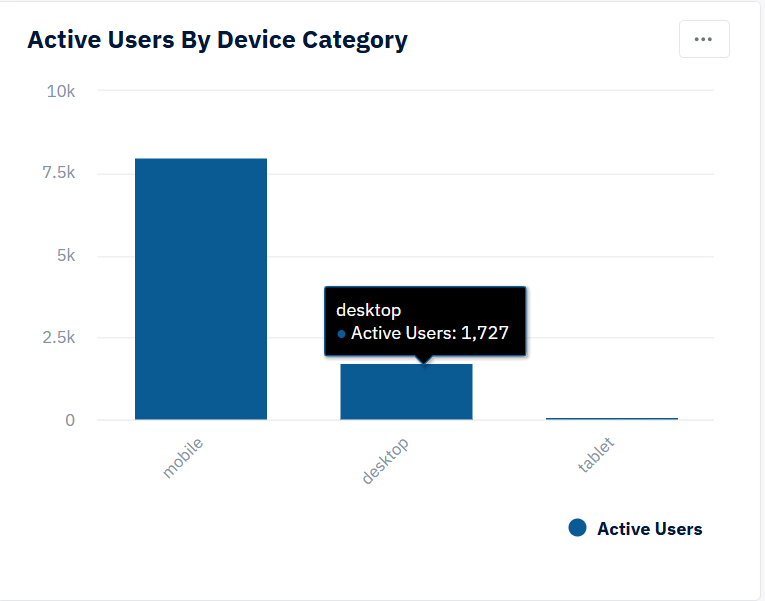
The Active Users by Device Category chart has been introduced in Google Analytics under the Social Analytics module, offering valuable insights into the types of devices your audience uses to engage with your content. This chart segments active users by device categories such as desktop, mobile, and tablet, helping brands understand how audiences are accessing their platforms.
By analyzing this data, teams can optimize content formats, design better user experiences, and ensure campaigns are tailored for the most frequently used devices. This enhancement enables smarter, device-aware decision-making and helps maximize engagement across all user touchpoints.
Navigation: Click on Social Analytics > Select Google Analytics profile > Scroll down to Active Users by Device Category Chart